


|
Name |
MemeOS Enhancer Pro |
|---|---|
|
Google Play Link |
GET IT ON
Google Play
|
|
Category |
Tools |
|
Developer |
Enes Apps |
| Last version | 5.6.6 |
|
Updated |
|
|
Compatible with |
Android 7.0+ |
Introduction to MemeOS Enhancer Pro APK
MemeOS Enhancer Pro is a mobile utility app designed for Android users who want quick access to detailed information about their device’s operating system. Instead of digging through multiple settings menus, the app gathers important system details and displays them in a clear interface. It focuses on simplicity, transparency, and fast access to data related to your device’s software environment.
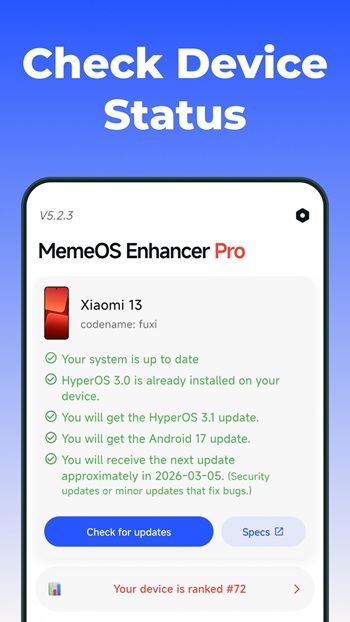
The main purpose of the app is to identify and display operating system information in a clean and understandable format. After installation, a built-in setup wizard helps detect the correct device configuration and suggests suitable methods for retrieving system data. Within seconds, users can view the OS version, device information, and security patch level. This saves time and reduces confusion for people who simply want to check what software their phone is running.
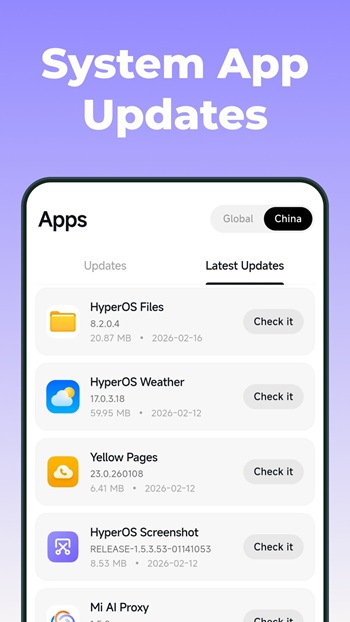
Several tools inside the app make it practical for everyday use. It shows changelogs, system details, and file information such as filenames and MD5 checksums, helping users verify software packages or confirm updates. A built-in news section shares articles related to Xiaomi devices and software developments. The interface also supports multiple visual styles, including light mode, dark mode, and automatic system-based themes, so the app blends naturally with the phone’s appearance.
Accessibility is another strong point. The design follows accessibility standards and supports screen readers, which helps users with visual impairments navigate the interface without difficulty. Clear layout choices and readable text make it easy for anyone to scan through system information quickly, even if they are not particularly tech-savvy.
One advantage of MemeOS Enhancer Pro is how transparent it is about file verification and system data. People who install custom updates or test firmware often want to confirm file integrity before proceeding, and the checksum display can help with that. The app also keeps the interface lightweight and quick to load, so checking system information rarely takes more than a few seconds.
There are a few limitations to keep in mind. The app mainly focuses on viewing information rather than modifying system settings, so advanced device customization is outside its scope. Some features, such as removing ads, require a subscription through Google Play. Users looking for deep system control tools may find the feature set relatively simple.
This app suits Android users who want clear OS information without complicated tools. It is especially useful for Xiaomi device owners, tech enthusiasts checking firmware details, or anyone verifying software versions before installing updates. For casual users, it works as a quick reference tool when confirming system details or learning more about their device’s software.
FAQs MemeOS Enhancer Pro
What is MemeOS Enhancer Pro used for?
+
MemeOS Enhancer Pro is an Android utility app that displays detailed operating system information, including OS version, device details, security patch level, and firmware data.
How does MemeOS Enhancer Pro detect device information?
+
The app includes a first-launch setup wizard that automatically identifies the device and selects the best method to collect system information safely.
Can MemeOS Enhancer Pro verify firmware files?
+
Yes. The app displays filenames and MD5 checksums so users can confirm the integrity of downloaded firmware or update packages.
Does MemeOS Enhancer Pro support dark mode and accessibility tools?
+
Yes. It offers light, dark, system-based themes and supports screen readers with a layout designed to follow accessibility standards.
Who should use MemeOS Enhancer Pro?
+
Android users who want quick access to OS details, firmware information, and device software status will find the app helpful, especially Xiaomi device owners.
Discover More Interesting Apps
-
 Mod
Mod
Material Capsule
v17.2
22.97 Mb
Updated -
Privacy Display
v1.9.2
10.17 Mb
Updated -
Mod
Vip Proxy Server
v2.12.41
35 MB
Updated -
Mod
Hola VPN
vX86_64_1.260.259
27.85 Mb
Updated -
Mod
1.1.1.1 VPN
v6.38.10
153.00 Mb
Updated -
TikFinity
v2.7.2
88.24 Mb
Updated -
Mod
Free VPN
v2.5.4.2
155.00 Mb
Updated -
K2er
v0.4.126
46.15 Mb
Updated -
Mod
Kimi
v3.1.4
71.19 Mb
Updated -
Mod
Proton VPN
v5.20.57.0
63.00 Mb
Updated










Share Your Thoughts